# Using NServiceBus Sagas with AWS Lambda, SQS, and DynamoDB
This sample shows a basic saga using AWS Lambda, SQS, and DynamoDB.
## Prerequisites
The sample includes a [`CloudFormation`](https://aws.amazon.com/cloudformation/aws-cloudformation-templates/) template that deploys the Lambda function and creates the necessary queues to run the code.
The [`Amazon.Lambda.Tools` CLI](https://github.com/aws/aws-lambda-dotnet) can be used to deploy the template to an AWS account.
1. Install the [`Amazon.Lambda.Tools CLI`](https://github.com/aws/aws-lambda-dotnet#amazonlambdatools) using `dotnet tool install -g Amazon.Lambda.Tools`
1. Make sure an [S3 bucket](https://aws.amazon.com/s3/) is available in the [AWS region](https://docs.aws.amazon.com/AmazonS3/latest/userguide/Welcome.html#Regions) of choice
## Running the sample
> [!NOTE]
> It is not possible at this stage to use the AWS .NET Mock Lambda Test Tool to run the sample locally.
Run the following command from the `Sales` directory to deploy the Lambda project:
`dotnet lambda deploy-serverless`
The deployment will ask for a stack name and an S3 bucket name to deploy the serverless stack. After that, running the sample will launch a single console window:
* **ClientUI** is a console application that will send a `PlaceOrder` command to the `Samples.DynamoDB.Lambda.Sales` endpoint, which is monitored by the AWS Lambda.
* The deployed **Sales** project will receive messages from the `Samples.DynamoDB.Lambda.Sales` queue and process them using the AWS Lambda runtime.
To try the AWS Lambda:
1. From the **ClientUI** window, press Enter to send a `PlaceOrder` message to the trigger queue.
2. The AWS Lambda will receive the `PlaceOrder` message and will start the `OrderSaga`.
3. The `OrderSaga` will publish an `OrderReceived` event and a business SLA message `OrderDelayed`.
4. The AWS Lambda receives the `OrderReceived` event, which is handled by the `BillCustomerHandler` and the `StageInventoryHandler`. After a delay, each handler publishes an event, `CustomerBilled` and `InventoryStaged`, respectively.
5. The AWS Lambda will receive the events. Once both events are received, the `OrderSaga` publishes an `OrderShipped` event. If it takes longer than the defined business SLA to bill and stage the order, the client is notified that the order is delayed by publishing `OrderDelayed`.
6. The **ClientUI** will handle the `OrderShipped` event and log a message to the console. It might also occasionally handle the `OrderDelayed` event and hand out 10% coupon codes.
## Code walk-through
The **ClientUI** console application is an Amazon SQS endpoint that sends `PlaceOrder` commands and handles the `OrderShipped` event.
The **Sales** project is hosted using AWS Lambda. The static NServiceBus endpoint must be configured with details from the AWS Lambda `ILambdaContext`. Since that is not available until a message is handled by the function, the NServiceBus endpoint instance is deferred until the first message is processed, using a lambda expression such as:
```cs
static readonly AwsLambdaSQSEndpoint endpoint = new AwsLambdaSQSEndpoint(context =>
{
var endpointConfiguration = new AwsLambdaSQSEndpointConfiguration("Samples.DynamoDB.Lambda.Sales");
var advanced = endpointConfiguration.AdvancedConfiguration;
advanced.UseSerialization();
advanced.SendFailedMessagesTo("Samples-DynamoDB-Lambda-Error");
var persistence = advanced.UsePersistence();
persistence.UseSharedTable(new TableConfiguration()
{
TableName = "Samples.DynamoDB.Lambda",
});
return endpointConfiguration;
});
```
The same class defines the AWS Lambda function that hosts the NServiceBus endpoint. The `ProcessOrder` method hands off processing of the message to NServiceBus:
```cs
public async Task ProcessOrder(SQSEvent eventData, ILambdaContext context)
{
context.Logger.Log("ProcessOrder was called");
await endpoint.Process(eventData, context, CancellationToken.None);
}
```
Meanwhile, the `OrderSaga` hosted within the AWS Lambda project is a standard NServiceBus saga that can also send and receive messages.
```cs
public class OrderSaga : Saga,
IAmStartedByMessages,
IHandleMessages,
IHandleMessages,
IHandleTimeouts
{
protected override void ConfigureHowToFindSaga(SagaPropertyMapper mapper)
{
mapper.MapSaga(sagaData => sagaData.OrderId)
.ToMessage(s => s.OrderId)
.ToMessage(s => s.OrderId)
.ToMessage(s => s.OrderId);
}
public async Task Handle(PlaceOrder message, IMessageHandlerContext context)
{
log.Info($"Placing order: {Data.OrderId}");
await RequestTimeout(context, TimeSpan.FromSeconds(8), new OrderDelayed { OrderId = message.OrderId });
await context.Publish(new OrderReceived
{
OrderId = message.OrderId
});
}
public async Task Handle(CustomerBilled message, IMessageHandlerContext context)
{
log.Info($"The customer for order {Data.OrderId} has been billed.");
Data.CustomerBilled = true;
await ShipItIfPossible(context);
}
public async Task Handle(InventoryStaged message, IMessageHandlerContext context)
{
log.Info($"The inventory for order {Data.OrderId} has been staged.");
Data.InventoryStaged = true;
await ShipItIfPossible(context);
}
public async Task Timeout(OrderDelayed state, IMessageHandlerContext context)
{
log.Info($"Order {Data.OrderId} is slightly delayed.");
await context.Publish(state);
}
async Task ShipItIfPossible(IMessageHandlerContext context)
{
if (Data is { CustomerBilled: true, InventoryStaged: true })
{
log.Info($"Order {Data.OrderId} has been shipped.");
// Send duplicate message for outbox test.
await context.Publish(new OrderShipped { OrderId = Data.OrderId });
MarkAsComplete();
}
}
static ILog log = LogManager.GetLogger(typeof(OrderSagaData));
}
```
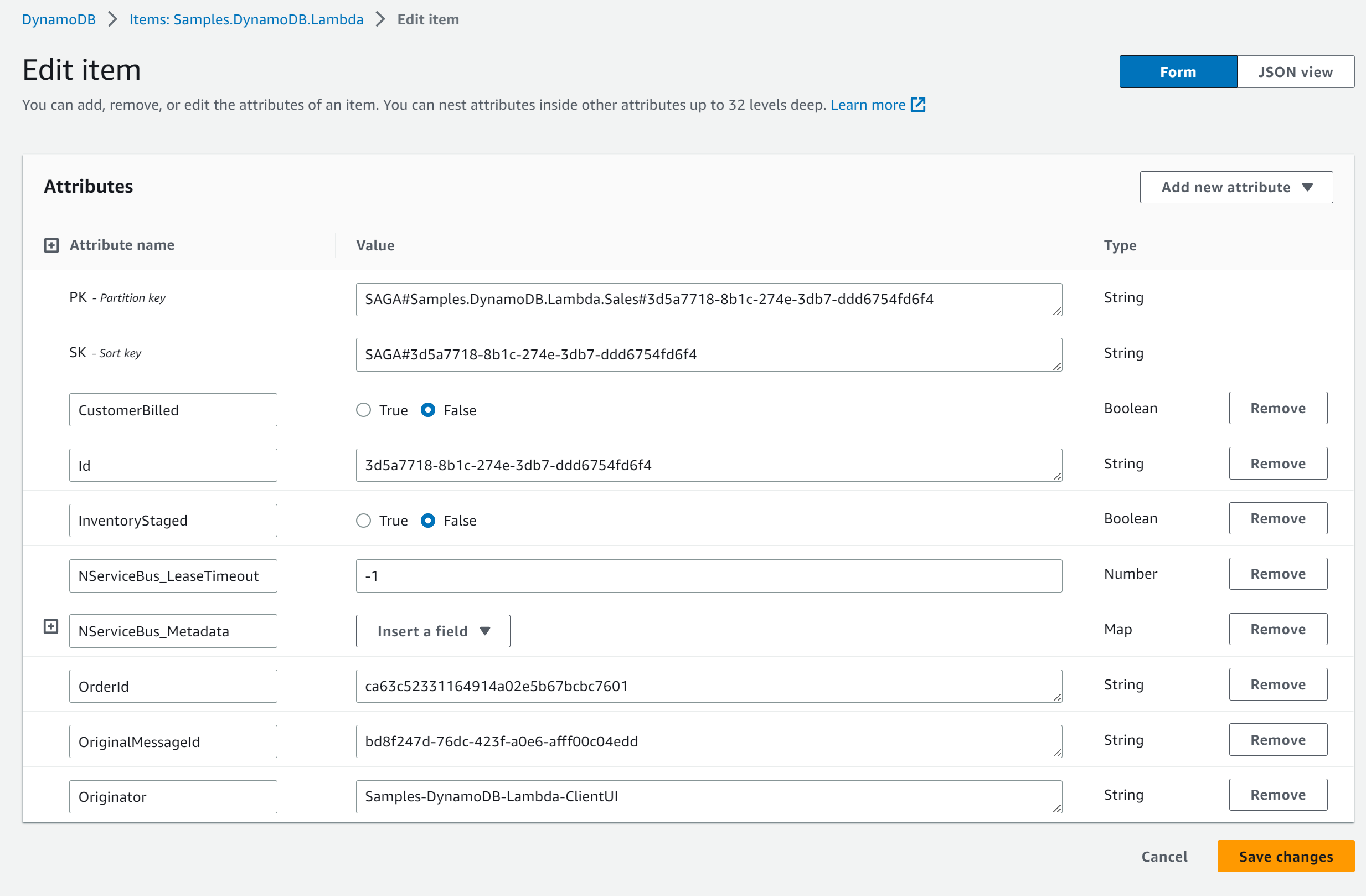
The saga data is stored in the `Samples.DynamoDB.Lambda` table and can be viewed in the AWS web portal:
## Removing the sample stack
Remove the deployed stack with the following command:
`dotnet lambda delete-serverless`
and provide the previously chosen stack name.