# NServiceBus Step-by-step: Publishing Events
So far in this tutorial, we have only sent **commands**, meaning one-way messages from a sender to a specific receiver. There's another type of message we have yet to cover called an **event**. In many ways events are just like commands. They're simple classes and you deal with them in much the same way. But from an architectural standpoint, commands and events are *polar opposites*. This creates a useful dichotomy. We can take advantage of the properties of events to open up new possibilities in how we design software.
In the next 25-30 minutes, you will learn how the publish/subscribe pattern can help you create more maintainable code. Together, we'll learn to define, publish, and subscribe to an event.
## Events
Unlike a **command** which is sent to only one receiver, an **event** is another type of message that is published to multiple receivers. Let's take a look at the formal definitions for commands and events:
A **command** is a message that can be sent from one or more senders and is processed by a single receiver.
An **event** is a message that is published from a single sender, and is processed by (potentially) many receivers.
You can see that in many ways, commands and events are exact opposites, and the differences in their definition leads us to different uses for each.
A command can be sent from anywhere, but is processed by one receiver. This is very similar to a web service, or any other [RPC](https://en.wikipedia.org/wiki/Remote_procedure_call)-style service. The big difference is that a command does not have any return value like a web service would have. This means that the handler for the command is doing work for whomever is calling it, and that the sender has a very good idea about what it expects to happen as a result of sending the command. It is the sender saying "Will you please do something for me?" and so commands should be named in the [imperative tense](https://en.wikipedia.org/wiki/Imperative_mood), like `PlaceOrder` and `ChargeCreditCard`. This creates tight coupling between the sender and receiver, because while it is possible to reject a command, you can't have true autonomy if someone else can tell you what to do.
An event, on the other hand, is sent by one logical sender, and received by many receivers, or maybe one receiver, or even zero receivers. This makes it an announcement that something has already happened. A subscriber can't reject or cancel an event any more than you could stop the New York Times from delivering newspapers to all of their subscribers. The publisher has no idea (and doesn't care) what receivers choose to do with the event; it's just making an announcement. So events should be named in the [past tense](https://en.wikipedia.org/wiki/Past_tense), commonly ending with the **-ed** suffix, like `OrderPlaced` and `CreditCardCharged`. This creates loose coupling, because while the contract (the content of the message) must be agreed upon, there is no requirement that subscribers of an event do anything.
Let's take a look at these differences side-by-side:
| | Commands | Events |
|---|:--------:|:------:|
| Interface | `ICommand` | `IEvent` |
| Logical Senders | One or more | 1 |
| Logical Receivers | 1 | Zero or more |
| Purpose | "Please do something" | "Something has happened" |
| Naming (Tense) | Imperative | Past |
| Examples | `PlaceOrder`
`ChargeCreditCard` | `OrderPlaced`
`CreditCardCharged` |
| Coupling Style | Tight | Loose |
From this comparison, it's clear that commands and events will sometimes come in pairs. A command will arrive, perhaps from a website UI, telling the system to `DoSomething`. The system does that work, and as a result, publishes a `SomethingHappened` event, which other components in the system can react to.
> [!NOTE]
> For more details, see [Messages, Events and Commands](/nservicebus/messaging/messages-events-commands.md)
The loose coupling provided by publishing events gives us quite a bit of flexibility to design our software systems in a much more maintainable way.
## Better code through decoupling
Imagine you are implementing a `SubmitOrder` method for an e-commerce website. To complete the sale, you need to retrieve the shopping cart, insert an Order and OrderLines into the database, authorize a credit card transaction and capture the authorization, and email the user their receipt. You also may need to notify a fulfillment agency via a web service, update a wish list or gift registry, or store "frequently bought together" information, all depending upon your specific business requirements.
You could do all this work in one monolithic method with hundreds of lines of code. You could further organize it by making each task a separate method, and have the `SubmitOrder` method call into each one of them in turn; but while this makes each method more manageable, it doesn't reduce the risk of running all those processes in a chain.
When one of the steps in that long chain fails, you're left with a partially completed process that requires manual intervention to fix, either by mucking around manually in the database, manually reconciling with a credit card processor, or manually sending confirmation emails.
By using events, we can follow the [single responsibility principle](https://en.wikipedia.org/wiki/Single_responsibility_principle) and divide up these concerns into separate message handlers. Simply publish `OrderPlaced`, and all the other components that subscribe to it will take care of their own concerns.
This means that when the code for the credit card processing changes, we don't even need to touch (let alone test and redeploy) any of the code in the system except for that which is directly related to processing credit cards.
## Defining events
Creating an event message is similar to creating a command. We create a class and mark it with the `IEvent` (rather than `ICommand`) interface.
```cs
public class SomethingHappened : IEvent
{
public string? SomeProperty { get; set; }
}
```
All the other considerations for command messages apply to events as well. Properties can be simple types, complex types, or collections, depending on what the message serializer supports.
With events, you should be even more careful about putting too much information in an event message. Sometimes this complexity can't be avoided for commands, as the command receiver needs the information to do its job. That's manageable for commands because the sender and receiver are highly coupled already. For events, it's a different story. Since a publisher of an event does not know (or care) how many subscribers it has, it may not be possible to modify all of them if a change is required to the event.
## Handling events
Create a handler class by implementing `IHandleMessages` where `T` is the type of the event message.
```cs
public class SomethingHappenedHandler : IHandleMessages
{
public Task Handle(SomethingHappened message, IMessageHandlerContext context)
{
// Do something with the event here
return Task.CompletedTask;
}
}
```
## Exercise
Now that we've learned about events and the publish/subscribe pattern, let's make use of it in our ordering system. When a user places an order, we're going to publish an `OrderPlaced` event, then subscribe to it from two brand new endpoints: **Billing** and **Shipping**.
We'll also create a new `OrderBilled` event that will be published by the **Billing** endpoint once the credit card transaction is complete.
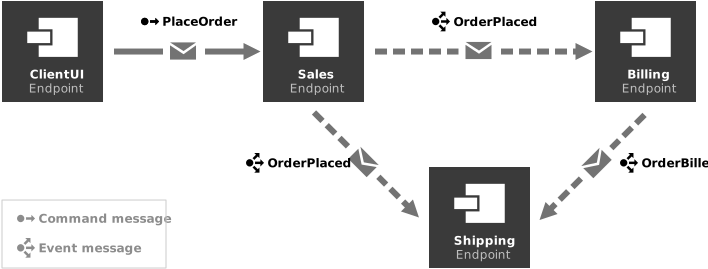
When the **Shipping** endpoint receives both the `OrderPlaced` and `OrderBilled` events, it will know that it is time to ship the product to the customer. Because this requires stored state, we can't accomplish that with message handlers alone. To implement that functionality, we would need a [Saga](/nservicebus/sagas/index.md), but that will not be covered in this lesson.
### Create an event
Let's create our first event, `OrderPlaced`:
1. In the **Sales.Messages** project, create a new class called `OrderPlaced`.
1. Mark `OrderPlaced` as `public` and implement `IEvent`.
1. Add a public property of type `string?` named `OrderId`.
When complete, your `OrderPlaced` class should look like the following:
```cs
public class OrderPlaced : IEvent
{
public string? OrderId { get; set; }
}
```
### Publish an event
Now that the `OrderPlaced` event is defined, we can publish it from the `PlaceOrderHandler`.
1. Locate the `PlaceOrderHandler` within the **Sales** endpoint.
1. Remove the `return Task.CompletedTask;` line.
1. Modify the `Handle` method to look like the following:
```cs
public Task Handle(PlaceOrder message, IMessageHandlerContext context)
{
logger.LogInformation("Received PlaceOrder, OrderId = {OrderId}", message.OrderId);
// This is normally where some business logic would occur
var orderPlaced = new OrderPlaced
{
OrderId = message.OrderId
};
return context.Publish(orderPlaced);
}
```
If we run the solution now, nothing new or exciting will happen, at least visibly. We're publishing a message, but there are no subscribers so no physical messages actually get sent anywhere. We're like a newspaper with no circulation. To fix that, we need a subscriber.
### Create a subscriber
Unlike the command, `PlaceOrder`, which is a request to do something, `OrderPlaced` is an announcement that something has actually happened. So another endpoint needs to register interest in hearing about placed orders.
When an order is placed, we want to charge the credit card for that order. So we will create a **Billing** service, which will subscribe to `OrderPlaced` so that it can handle the payment transaction.
> [!NOTE]
> Since this is the third endpoint we've created, the instructions will be a little more abbreviated. Refer back to [Lesson 2](../2-sending-a-command/index.md) where we created the Sales endpoint for more detailed instructions.
1. Create a new **Console Application** named **Billing**.
1. Add references to the **NServiceBus** NuGet package and the **Sales.Messages** assembly.
1. Copy the configuration from the **Program.cs** file in **Sales**, and paste it into the same file in **Billing**.
1. In the **Billing** endpoint's **Program.cs**, change the value of `Console.Title` and the endpoint name argument of the `EndpointConfiguration` constructor to `"Billing"`.
1. In the **Billing** endpoint, add a class named `OrderPlacedHandler`, mark it as `public`, and implement `IHandleMessages`.
1. Modify the handler class to log the receipt of the event:
```cs
public class OrderPlacedHandler(ILogger logger) : IHandleMessages
{
public Task Handle(OrderPlaced message, IMessageHandlerContext context)
{
logger.LogInformation("Received OrderPlaced, charging OrderId: {OrderId}", message.OrderId);
return Task.CompletedTask;
}
}
```
Finally, modify the solution properties so that **Billing** will start when debugging.
Now when we run the solution, we'll see the following output in the **Billing** window:
```
info: Billing.OrderPlacedHandler[0]
Received OrderPlaced, charging OrderId: a875a956-2ab2-4bb5-aec9-c1048d5faa2b
```
That's great, but why stop there? The whole point of Publish/Subscribe is that we can have *multiple* subscribers.
### Create another subscriber
In a real system, after an order is placed and billed, we need to ship the products. So let's add another event and two more subscribers. Once the credit card is charged, we'll publish an `OrderBilled` event. Next, we'll create a new endpoint **Shipping** that will subscribe to both events.
This is also a good opportunity to check your understanding. If you can complete these steps without looking back at previous steps or previous lessons, you can be sure you have a good understanding of everything we've covered so far. (Don't worry, you can always check your work against the solution.)
1. Create a new **Class Library** named **Billing.Messages**
1. In **Billing.Messages**, create a new event called `OrderBilled`, implementing `IEvent` and containing a property for the `OrderId`.
1. In **Billing**, publish the `OrderBilled` event at the end of the `OrderPlacedHandler`.
1. Create a new endpoint named **Shipping** with the necessary dependencies. Be sure to set the console title and endpoint name to `"Shipping"`, and configure it to start when debugging.
1. In **Shipping**, create a message handler for `OrderPlaced`.
1. In **Shipping**, create a message handler for `OrderBilled`.
### Running the solution
If everything worked, you should now see output like this in your **Shipping** window:
```
info: Shipping.OrderPlacedHandler[0] Received OrderPlaced, OrderId = efbceb55-2e41-4fa6-b390-5a08d8763ae7 - Should we ship now?
info: Shipping.OrderBilledHandler[0] Received OrderBilled, OrderId = efbceb55-2e41-4fa6-b390-5a08d8763ae7 - Should we ship now?
```
Of course, these messages could appear out of order. With asynchronous messaging, there are no message ordering guarantees. Even though `OrderBilled` comes logically after `OrderPlaced`, it's possible that `OrderBilled` could arrive first.
You'll note that in the sample solution, the message for each handler says "Should we ship now?" This is because both message handlers are stateless. Like HTTP requests, message handlers have no intrinsic memory of what came before. NServiceBus contains a feature called [Sagas](/nservicebus/sagas/index.md) that provides the ability to retain state between messages, but that won't be covered in this lesson.
## Summary
In this lesson we learned all about events, how they differ from commands, and how that enables us to create systems that are more decoupled and that adhere to the Single Responsibility Principle. We published an `OrderPlaced` event from the **Sales** endpoint, and created the **Billing** and **Shipping** endpoints to subscribe to that event. We also published the `OrderBilled` event from the **Billing** endpoint, and subscribed to it in **Shipping**.
In the final lesson for this tutorial, we'll see what happens when we introduce errors into our system, and see how we can automatically retry those messages to make a truly resilient system.