Using multiple storage accounts is currently NOT compatible with ServiceControl. Either multiple installations of ServiceControl for monitoring or the ServiceControl transport adapter are required for these situations.
It is common for systems running on Azure Storage Queues to depend on a single storage account. However, there is a potential for throttling issues once the maximum number of concurrent requests to the storage account is reached, causing the storage service to respond with an HTTP 503 Server Busy message. Multiple storage accounts can be used to overcome this.
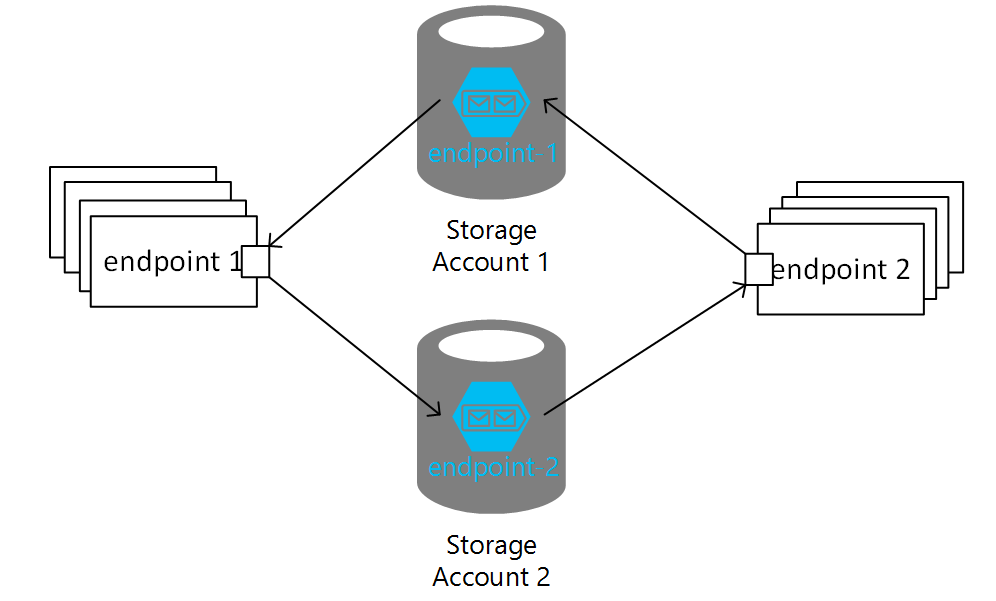
To determine whether your system may benefit from scaling out to multiple storage accounts, refer to the the Scale targets table in the Azure Scalability and performance targets for Queue Storage article, which define when throttling starts to occur.
For additional guidance on considerations when developing a system using Azure Storage Queues, see the article on Performance and scalability checklist for Queue Storage.
Use real Azure storage accounts. Do not use Azure storage emulator as it only supports a single fixed account named "devstoreaccount1".
There are limits to how much increasing the number of storage accounts increases throughput. Consider using scale units as part of a comprehensive scaling strategy to address higher throughput and reliability needs.
Configuring multiple storage accounts
Each additional storage account must be registered with the endpoint using a distinct name that acts as an alias for the physical storage account represented by a QueueServiceClient or a connection string (for backward compatibility).
Additionally, while it is not required, the account used when initializing the AzureStorageQueueTransport should also be given an alias.
The default alias is an empty string.
To enable sending from an endpoint using account_A to an endpoint using account_B, the endpoint on account_B needs to be registered on the account using the AddEndpoint method. Subscribing to publishing endpoints on other storage accounts uses an overload of the AddEndpoint method.
Putting it all together multiple account configuration looks like this:
var transport = endpointConfiguration.UseTransport<AzureStorageQueueTransport>();
transport.ConnectionString("account_A_connection_string");
transport.DefaultAccountAlias("account_A");
var accountRouting = transport.AccountRouting();
var remoteAccount = accountRouting.AddAccount("account_B", "account_B_connection_string");

// Add an endpoint that receives commands
remoteAccount.RegisteredEndpoints.Add("RemoteEndpoint");

// Add endpoints that subscribe to events
remoteAccount.RegisteredEndpoints.Add("RemoteSubscriberEndpoint");

// Add endpoints that this endpoint publishes messages this endpoint subscribes to
// This is not supported in this version
The examples above use different values for the default account aliases. Using the same name, such as default, to represent different storage accounts in different endpoints is highly discouraged as it introduces ambiguity in resolving addresses like queue@default and may cause issues when e.g. replying. In that case an address is interpreted as a reply address, the name default will point to a different connection string.
Using send options
The SendOptions class provides ways to influence routing of a message. When using multiple storage accounts the SendOptions methods that take an endpoint name to further specifiy the storage account.
When replying to a message, SendOptions can specify an alternative endpoint to send the reply to and endpoint on another storage account using the alias:
var sendOptions = new SendOptions();
sendOptions.RouteReplyTo("sales@accountAlias");

await context.Send(
    message: new MyMessage(),
    options: sendOptions);
Although registering endpoints to route messages is preferred, NServiceBus allows overriding the default routing using SendOptions, which also works with storage account aliases:
var sendOptions = new SendOptions();
sendOptions.SetDestination("sales@accountAlias");

await context.Send(
    message: new MyMessage(),
    options: sendOptions);

//Or with a helper extension method:

await context.Send(
    destination: "sales@accountAlias",
    message: new MyMessage());