The Particular Service Platform is licensed based on the number of NServiceBus endpoints and the message throughput of those endpoints. In order to determine these values, a process needs to be run that queries the transport broker for up to 24 hours, and a report generated from this data to be sent to Particular.
The minimal installation required to generate the usage report is:
- ServiceControl. For most transports, only a single error instance is required, as this is the primary service that contains the broker querying logic. Certain transports cannot query the broker directly; for these an audit or monitoring instance will also be required and all endpoints will need to be configured to send data to these instances.
- ServicePulse. This is the UI that interfaces with the ServiceControl service to allow users to specify which endpoints are NServiceBus related and generate the usage report to send to Particular.
ServicePulse can run in an integrated mode and be started from within ServiceControl, in which case no additional installation is required. This can be enabled when installing via the ServiceControl Management Utility as well as when running via Containers.
Installation options
By default, the ServiceControl instance will immediately start reading from the error queue when it starts. If this is not desired, e.g. if you have another process that monitors the error queue, then set the SERVICECONTROL_INGESTERRORMESSAGES environment variable to false in any of the following installation options. This variable needs to be set for the account under which the ServiceControl instance is running or on the container.
The following methods can be used to install these requirements:
- Linux, Windows or cloud environments via Containers
- ServiceControl and ServicePulse through Containers
- Windows Only
- ServiceControl through ServiceControl Management Utility
- ServiceControl through Powershell
- ServicePulse running in an integrated mode from within ServiceControl Management Utility
- ServicePulse as a standalone Windows service
When installing ServiceControl, a connection string to a transport is required. Since this may differ in format from the native connection string for the underlying queuing technology, please check the associated Configuration or Connection Settings page for your selected transport.
Container Installation
When installing ServiceControl directly, through one of the Windows installation options below, it includes an embedded RavenDB instance that stores all the data required for generating usage reports (and any other functions of ServiceControl that you may use). When using containers, a separate RavenDB database is required that can also be containerized. An example of this can be found in the Platform Container Examples repository.
The containers required for generating a usage report are:
- RavenDB
- Alternatively another RavenDB source can be used. The connection string must be supplied when installing ServiceControl
- ServiceControl
- ServicePulse (if not running in integrated mode)
Cloud environments
When hosting containers in Kubernetes in any of the major Cloud providers, it is possible to host RavenDB in Kubernetes using the recommended storage providers by the Cloud infrastructure, see these example manifests for deployments in AKS or EKS. In hosting environments where the RavenDB's storage requirements cannot be met, it is recommended to use RavenDB Cloud to host the database.
Windows Installation
ServiceControl
ServiceControl is installed as a Windows service, and starts automatically. It includes an embedded RavenDB instance that stores all the data required for generating usage reports (and any other functions of ServiceControl that you may use).
ServiceControl Management Utility (SCMU)
- Download the latest SCMU
- Run the executable. This will require Admin privileges.
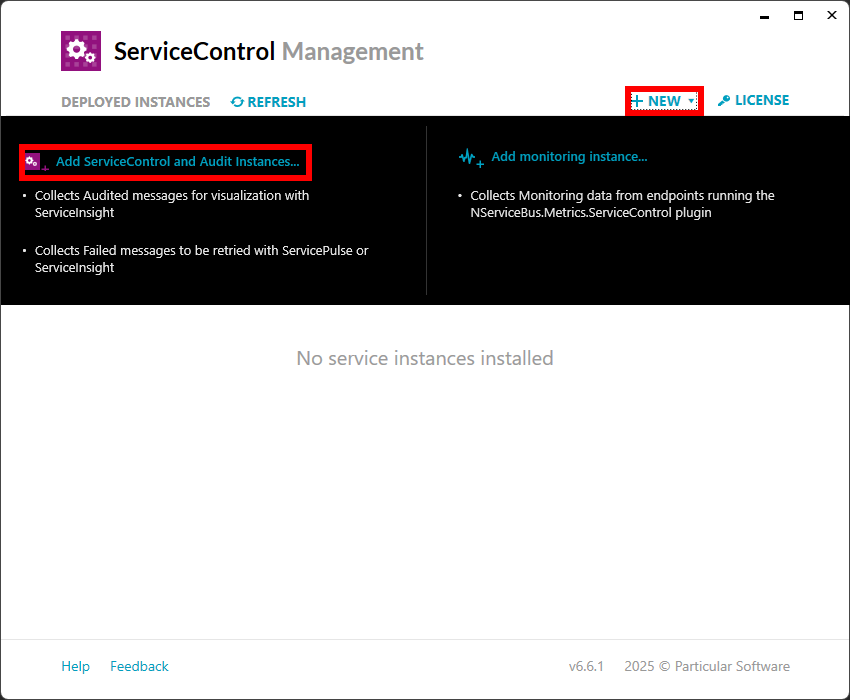
- Add a new ServiceControl instance
- Choose your transport and supply the connection string
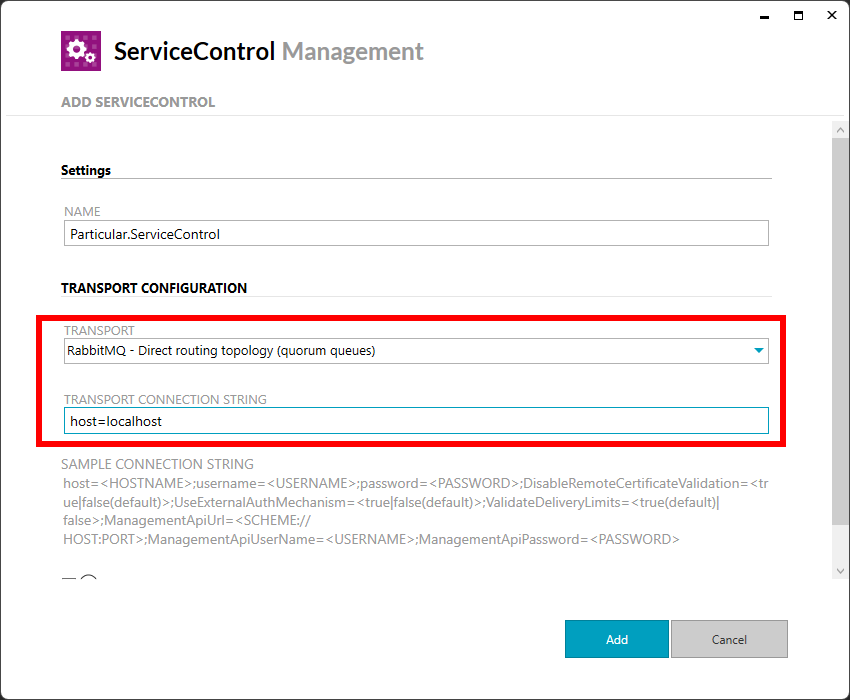
- Click 'Add'
Powershell
- Ensure you meet the prerequisites
- Install and import the Particular.ServiceControl.Management module
- Run the New-ServiceControlInstance cmdlet
- Most parameters can remain as shown in the example, with the
-Transportand-ConnectionStringvalues set according to your environment.
- Most parameters can remain as shown in the example, with the
ServicePulse
ServicePulse can be installed separately as a Windows service, or it can run in an integrated mode from within the ServiceControl Management Utility (SCMU).
Integrated into ServiceControl Management Utility (SCMU)
This is the easiest and recommended way to run ServicePulse for generating usage reports.
New installations
When installing a new instance of ServiceControl via SCMU, once the service is installed and running, a link to launch an integrated version of ServicePulse will be visible in SCMU. 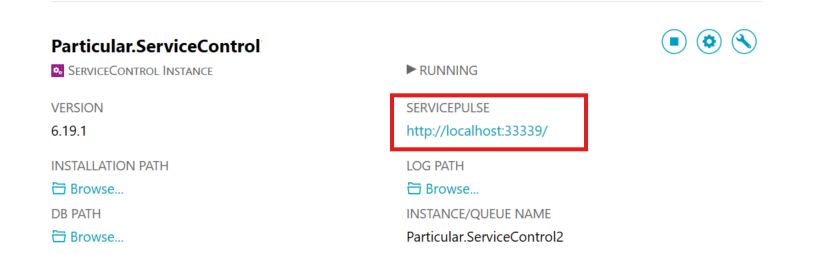
Upgrades
When upgrading from an older version of ServiceControl via SCMU, ensure you click the Enable Integrated ServicePulse option. 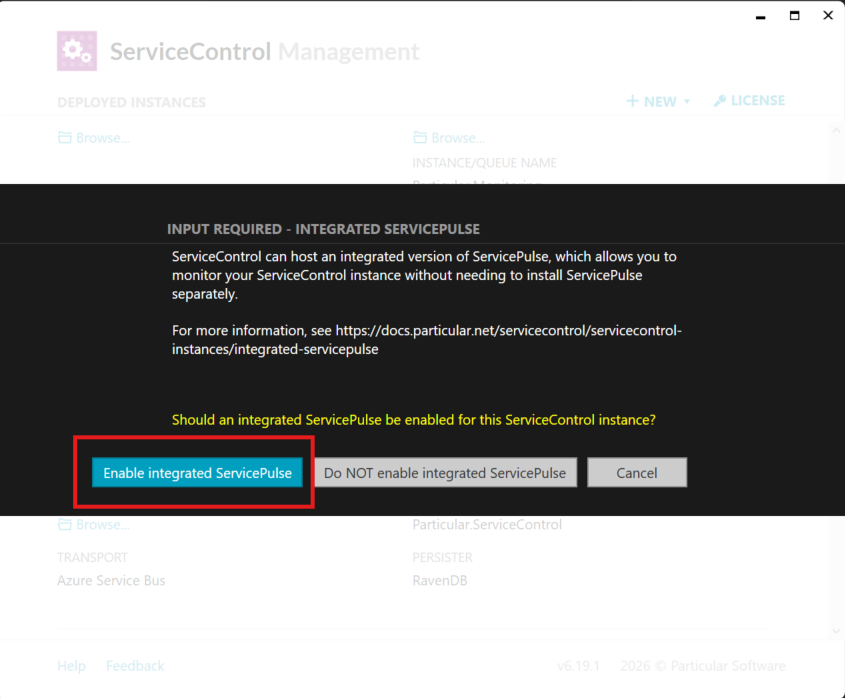
Standalone
Follow the installation instructions and ensure ServicePulse is configured to point to the port of the ServiceControl instance installed above.